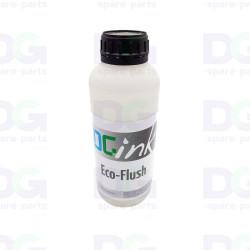
2-litre flush cistern with microchip – White and Arizona/Acuity gloss finish


✔️ 2-litre flushing solvent pouch with chip
✔️ Océ Arizona & Fujifilm Acuity printheads – White / Varnish
✔️ Specify chip type: 256, 257, KI, KN…
✔️ Extended shutdown: at least 2 short flush cycles
-
 New or refurbished at the best price
-
 Fast shipping within 24 hours
-
 Worldwide delivery

Product description
2-litre flush pouch with chip – Flushing the White and Varnish circuits – Arizona / Acuity
The 2-litre flush pouch is a maintenance consumable designed for flushing the White and Varnish ink circuits in Canon Océ Arizona and Fujifilm Acuity flatbed UV printers. It fits in place of a standard ink bag and supplies solvent to the circuit during the machine’s flushing cycle.
White inks (titanium pigment) and varnishes are the two most sensitive fluids in a UV printer: the white ink settles as soon as circulation stops, whilst the varnish cures in the nozzles. Flushing the entire circuit with solvent before a prolonged shutdown is therefore the only way to protect the White and Varnish printheads and avoid a costly replacement when operations resume.
The pouch is supplied with a chip, which is essential for the machine to recognise the consumable and authorise the flushing cycle. Several generations of chips are in use (IJC-256, IJC-257, Uvijet KI, KN, etc.): please specify the type of chip used on your machine when placing your order. Sold individually.
Technical specifications
- Product description: flushing solvent pouch for White and Varnish circuits
- Capacity: 2 litres
- Chip: integrated – type to be specified when ordering (IJC-256, IJC-257, Uvijet KI, KN, etc.)
- Product type: maintenance consumable, not printable
- Machines: Canon Océ Arizona and Fujifilm Acuity models fitted with White and/or Varnish
- Usage: Tools menu > Flush > Short flush
- Recommended cycles: at least 2 per circuit
- Packaging: sold individually
Compatibility and use
- Canon Océ Arizona 2xx / 3xx / 5xx series (250, 300, 318 GL, 350, 360, 365, 550 GT and XT)
- Canon Océ Arizona 22xx series (2240, 2260, 2280 GT and XT)
- Fujifilm Acuity models fitted with a white and/or varnish unit
- Other Arizona / Acuity models fitted with White and Varnish circuits: please contact us
- The chip must match the ink set installed on the machine – please specify this when ordering
Function
- Flush white ink and varnish from the entire circuit before a prolonged shutdown
- Prevents white pigment from settling in the hoses, filters and print heads
- Prevent the varnish from curing in the nozzles and pipes
- Preserve the white and varnish printheads during holidays, storage or transport
- To facilitate and ensure a reliable return to production
Long-term shutdown procedure for White and Varnish
If you need to switch off your Arizona for an extended period, and in order to ensure the White and Varnish printheads continue to function correctly, it is essential to flush the entire system by circulating solvent through the circuit.
This is done automatically via the Tools > Flush > Short Flush menu, using these flush bags. It is recommended that you carry out at least two flush cycles.
Then switch off the machine, following these instructions:
- Close the vacuum valves (if the machine is fitted with them)
- Empty the ink collection tray
- Open the maintenance drawer (ink will drain from the print heads)
- Cover the print carriage to prevent sunlight from reflecting beneath the print heads
- Disconnect the ink cartridges
When resuming operation, simply repeat the short flushing procedure (minimum 2 cycles) using white and varnish ink cartridges, then purge the ink filters.
The short flush cycle uses a large amount of fluid: use unopened cartridges to avoid any risk of air being drawn into the system.
Possible symptoms if flushing is not carried out
- Missing nozzles or completely blocked White/Varnish channels upon restarting
- Sedimentation and build-up of white pigment in the hoses, pump and filters
- Polymerised varnish in the circuit, irregular or no flow
- Clogged ink filters requiring replacement
- White and Varnish printheads beyond repair despite purging
Two flush bags and an hour’s procedure are sufficient to avoid having to replace a White or Varnish printhead: this is the preventative maintenance operation offering the best cost-to-risk ratio before any prolonged downtime.
♻️ DG Spare Parts – European specialist in spare parts for large-format printers and plotters.
Compatibility
| Compatible with Océ-Canon® | Canon Océ Arizona 1240 GTCanon Océ Arizona 1240 XTCanon Océ Arizona 1260 GTCanon Océ Arizona 1260 XTCanon Océ Arizona 1280 GTCanon Océ Arizona 1280 XTCanon Océ Arizona 200 GTCanon Océ Arizona 2240 GTCanon Océ Arizona 2240 XTCanon Océ Arizona 2260 GTCanon Océ Arizona 2260 XTCanon Océ Arizona 2280 GTCanon Océ Arizona 2280 XTCanon Océ Arizona 250 GTCanon Océ Arizona 300 GTCanon Océ Arizona 318 GLCanon Océ Arizona 350 GTCanon Océ Arizona 350 XTCanon Océ Arizona 360 GTCanon Océ Arizona 360 XTCanon Océ Arizona 365 GTCanon Océ Arizona 365 XTCanon Océ Arizona 440 GTCanon Océ Arizona 440 XTCanon Océ Arizona 460 GTCanon Océ Arizona 460 XTCanon Océ Arizona 480 GTCanon Océ Arizona 480 XTCanon Océ Arizona 550 GTCanon Océ Arizona 550 XTCanon Océ Arizona 6160 XTSCanon Océ Arizona 6170 XTSCanon Océ Arizona 640 GTCanon Océ Arizona 640 XTCanon Océ Arizona 660 GTCanon Océ Arizona 660 XT |
|---|---|
| Compatible with Fujifilm® | Fujifilm Acuity Advance HD 2504Fujifilm Acuity Advance HD 2545Fujifilm Acuity Advance HD 2545 X2Fujifilm Acuity Advance HD 2565Fujifilm Acuity Advance HD 2565 X2Fujifilm Acuity Advance HS HD 3545Fujifilm Acuity Advance HS HD 3545 X2Fujifilm Acuity Advance Select HD4004Fujifilm Acuity Advance Select HD4006Fujifilm Acuity Advance Select HD4008Fujifilm Acuity Advance Select HD4224Fujifilm Acuity Advance Select HD4226Fujifilm Acuity Advance Select HD4228Fujifilm Acuity Advance Select HD5004Fujifilm Acuity Advance Select HD5006Fujifilm Acuity Advance Select HD5224Fujifilm Acuity Advance Select HD5226Fujifilm Acuity F66Fujifilm Acuity F67Fujifilm Acuity Select 24Fujifilm Acuity Select 26Fujifilm Acuity Select 28Fujifilm Acuity Select HS 36Fujifilm Acuity Select HS 38Fujifilm Acuity Select HS X36Fujifilm Acuity Select HS X38Fujifilm Acuity Select X24Fujifilm Acuity Select X26Fujifilm Acuity Select X28 |
Other products in the same category


✔️ 2-litre flushing solvent pouch with chip
✔️ Océ Arizona & Fujifilm Acuity printheads – White / Varnish
✔️ Specify chip type: 256, 257, KI, KN…
✔️ Extended shutdown: at least 2 short flush cycles